

Applying for permits is an essential step for many construction, renovation, remodeling, and development projects throughout the United States. Whether you are building a new home, adding a deck, renovating a commercial property, installing a new HVAC system, or making structural modifications, local governments typically require permits before work can begin.
Fortunately, most cities and counties now offer digital permitting systems that allow homeowners, contractors, architects, and developers to submit applications online. While the process has become much more convenient, the exact requirements and procedures vary from one jurisdiction to another.
Some permit portals are simple and easy to navigate, while others require detailed documentation and multiple review stages. Understanding the general process can help you avoid delays and improve your chances of obtaining approval quickly.
This guide explains everything you need to know about submitting an Online Permit Application in USA, including where to apply, what documents you need, common mistakes to avoid, and how to track your application after submission.
Table of Contents
- Find Your City’s Permit Portal
- Create an Account
- Types of Permits Available Online
- What to Upload
- How to Prepare Your Project Details
- Submit Your Online Permit Application
- Tracking Your Application
- Practical Permit Review Checklist
- Common Mistakes in Online Applications
- How Long Does Permit Approval Take?
- Benefits of Online Permit Applications
- Frequently Asked Questions
Find Your City’s Permit Portal
The first step in the Online Permit Application in USA process is locating the correct permit portal.
Most local governments use either custom-built permit systems or third-party permitting software. Before starting your application, visit your city’s official website and look for sections labeled:
- Building Department
- Community Development
- Construction Services
- Permits and Inspections
Many municipalities use one of the following platforms:
City-Built Permit Portals
Many larger cities operate their own customized permitting systems designed specifically for local regulations and review processes.
Citizenserve
A popular platform used by many small and mid-sized municipalities for permit applications, inspections, and project tracking.
Accela
One of the most widely used permitting systems in the United States, particularly among larger cities and counties.
CSS (Community Services System)
A permit management platform used by several municipalities for online permit applications and inspections.
OpenGov
An increasingly popular cloud-based permitting platform that streamlines permit reviews and approvals.
EnerGov
A comprehensive permit management system used by many local governments for permitting, planning, and code enforcement.
Always verify that you are using the official government website to avoid scams or inaccurate information.
Create an Account
Most permit portals require users to create an account before beginning the application process.
When registering, provide:
- Full legal name
- Valid email address
- Phone number
- Mailing address
Use an email address you regularly monitor because all communication regarding your Online Permit Application submission will typically be sent there.
Depending on the jurisdiction, account types may include:
- Property Owner Accounts
- Contractor Accounts
- Architect Accounts
- Engineer Accounts
- Developer Accounts
After registration, verify your email address and activate your account before proceeding.
Types of Permits Available Online
Many cities now allow applicants to submit various permit types electronically.
Building Permits
Required for new construction, home additions, structural modifications, decks, garages, and remodeling projects.
Electrical Permits
Necessary for panel upgrades, wiring changes, generator installations, and other electrical work.
Plumbing Permits
Used for water line installations, sewer connections, plumbing fixture replacements, and system upgrades.
Mechanical Permits
Required for HVAC installations, furnaces, ventilation systems, and air conditioning units.
Zoning Permits
Ensure projects comply with local land-use regulations, setbacks, and property restrictions.
Demolition Permits
Required before removing structures or major building components.
What to Upload
Having your documents prepared beforehand can make the Online Permit Application process much smoother.
Most jurisdictions require some combination of the following:
Permit Application Form
A completed permit application form containing project information and applicant details.
Site Plan
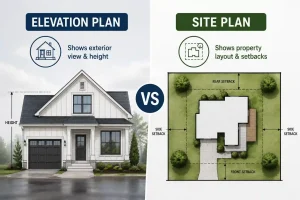
A scaled drawing showing property boundaries, structures, setbacks, easements, and the proposed work location.
Floor Plan
Often required for additions, renovations, and interior modifications.
Elevation Drawings
Needed when exterior changes affect the building’s appearance or dimensions.
Property Ownership Documents
Some jurisdictions require proof of ownership such as:
- Property deed
- Tax records
- Ownership authorization forms
HOA Approval Letter
If your property is located within a homeowners association, approval may be required before permit submission.
Contractor Information
If hiring a contractor, include:
- License number
- Business information
- Insurance documentation
Additional Supporting Documents
Depending on the project, you may also need:
- Engineering reports
- Energy compliance forms
- Surveys
- Environmental documentation
How to Prepare Your Project Details
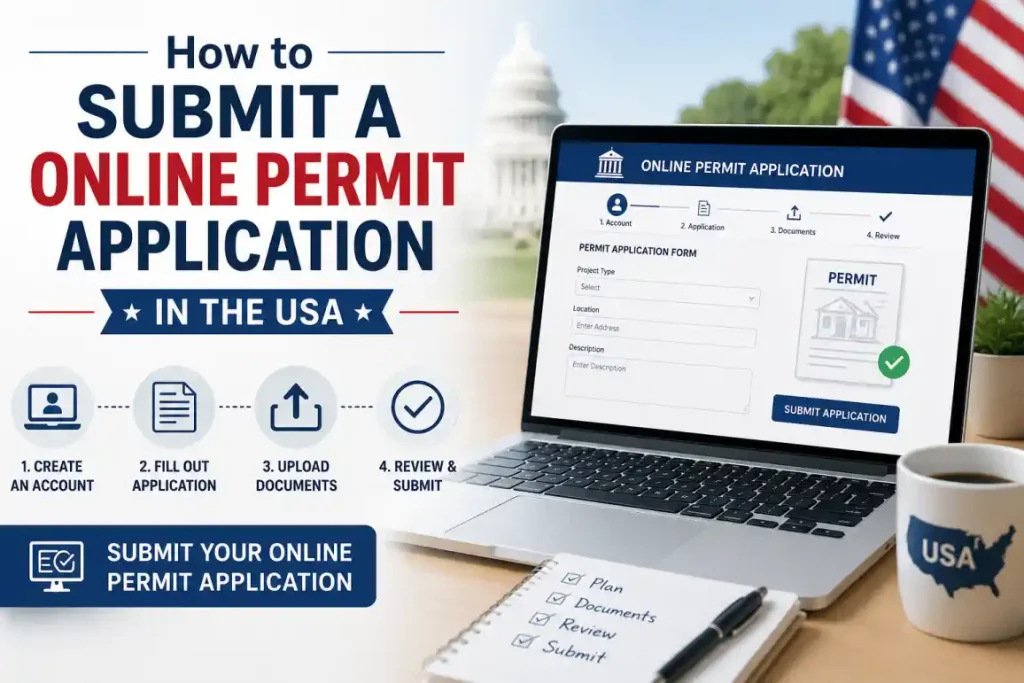
A strong application package usually results in a faster review process.
Before beginning your Online Permit Application, gather:
- Property address
- Parcel number
- Project description
- Photos of the work area
- Rough measurements
- Existing surveys
- Contractor sketches
- HOA documentation
Even preliminary information can help reviewers better understand your project.
For homeowners, the goal is not to create a highly technical architectural package. Instead, focus on providing clear, accurate, and organized information that allows reviewers to understand the scope of work.
Simple, well-organized plans often receive fewer correction requests than overly complicated submissions.
Submit Your Online Permit Application
Once all documents are ready, begin completing the permit application.
You will generally need to provide:
Property Information
- Property address
- Parcel identification number
- Property owner details
Project Description
Provide a concise yet detailed explanation of the proposed work.
For example:
“Construction of a 500-square-foot residential addition including electrical, plumbing, and HVAC modifications.”
Clear project descriptions help reviewers evaluate the project more efficiently.
Upload Documents
Ensure all required files are uploaded in the correct format.
Most systems accept:
- PDF files
- CAD drawings
- Supporting reports
Double-check file sizes and naming requirements before submission.
Pay Permit Fees
Most jurisdictions require payment before the review process begins.
Common payment methods include:
- Credit cards
- Debit cards
- Electronic checks
Submit the Application
Review everything carefully before clicking submit.
Confirm:
- Applicant information
- Project address
- Uploaded documents
- Permit type selection
- Payment confirmation
Once submitted, you will receive an application or permit tracking number.
Tracking Your Application
After submission, most systems allow applicants to monitor their permit status online.
Typical status updates include:
- Submitted
- Under Review
- Corrections Required
- Approved
- Permit Issued
Most cities also send automatic email notifications whenever the status changes.
If the published review period has passed and no updates are available, contact the building department directly for assistance.
Practical Permit Review Checklist
Before submitting your Online Permit Application, review your plans as if you were the city reviewer.
The plan should clearly show:
- Existing conditions
- Proposed work
- Property boundaries
- Setback distances
- Project location
- Parcel information
- North arrow
- Accurate dimensions
Use this checklist:
✔ Confirm property address and owner information
✔ Label existing and proposed work separately
✔ Verify setback dimensions
✔ Ensure measurements are consistent across all plans
✔ Use the correct file format required by the jurisdiction
✔ Include all supporting documents
A thorough review can significantly reduce correction requests and approval delays.
Common Mistakes in Online Applications
Many online permit applications experience delays because of avoidable mistakes. Common issues in online permit applications include using screenshots instead of scaled drawings, leaving out setbacks, showing old structures that no longer exist, forgetting easements, or submitting a plan that does not match the permit application.
Uploading Drawings That Are Not to Scale
Reviewers need accurate dimensions to evaluate compliance.
Incorrect File Sizes
Most portals limit uploads to approximately 50–100 MB.
Wrong File Format
Many jurisdictions require PDF files specifically.
Incomplete Application Forms
Missing project costs, descriptions, or applicant information can trigger delays.
Wrong Permit Type Selection
Choosing the incorrect permit category often requires restarting portions of the review process.
Missing HOA Approval
Some municipalities require HOA documentation before accepting applications.
Using Screenshots Instead of Permit Drawings
Permit reviewers typically require properly scaled plans rather than screenshots or photos.
Inconsistent Project Information
Plans, applications, and supporting documents should all match exactly.
Missing Easements or Existing Structures
Incomplete site information frequently results in correction requests.
Generic Drawings
Permit plans should be specific to your property and project rather than using generic templates.
How Long Does Permit Approval Take?
Permit review timelines vary significantly depending on the project and jurisdiction.
| Permit Type | Typical Approval Time |
|---|---|
| Minor Residential Work | 1–7 Days |
| Standard Remodel | 1–4 Weeks |
| Home Addition | 2–8 Weeks |
| Commercial Renovation | Several Weeks |
| Large Development Projects | Several Months |
Submitting a complete and accurate Online Permit Application package can significantly reduce review times.
Benefits of Online Permit Applications
Digital permitting systems provide several advantages over traditional paper submissions.
Greater Convenience
Applications can be submitted anytime without visiting government offices.
Faster Processing
Electronic workflows often reduce administrative delays.
Easier Communication
Review comments and correction requests can be handled electronically.
Real-Time Tracking
Applicants can monitor progress at every stage.
Digital Document Storage
Permits, plans, and correspondence remain accessible online for future reference.
Reduced Paperwork
Electronic submissions eliminate many printing and mailing requirements.
Conclusion
Submitting an Online Permit Application has become the standard method for obtaining permits across much of the country. While each city and county may have different requirements, the overall process remains similar: locate the correct permit portal, create an account, prepare your documents, submit your application, and track its progress through the review process.
By providing complete information from our team, uploading accurate plans, and avoiding common mistakes, homeowners and contractors can significantly improve approval times and reduce project delays. A well-prepared permit application not only saves time but also helps ensure your project complies with local building codes and regulations from the start.
Ready to Get Your Permit-Ready Plans?
24-hour turnaround · Starting at $79 · Unlimited revisions · 100% money-back guarantee
Frequently Asked Questions
Can I submit an online permit application without being the property owner?
Usually yes, if you’re a licensed contractor or authorized agent. You’ll need the owner’s information and often written authorization. Many cities allow licensed contractors to pull permits on behalf of property owners.
How long does online permit application review take?
For over-the-counter residential permits, some cities provide same-day or next-day approval. More complex projects requiring plan review typically take 1–3 weeks. Some major cities have 4–8 week review times.
What if my city doesn’t have an online permit portal?
Contact the building department directly to ask about their submission process. Most cities without online portals accept mailed or in-person applications with digital documents on a USB drive or CD.
Do I need to pay the permit fee for online permit application at time of submission?
Most cities require payment at time of application submission. Some allow you to submit first and pay after initial review. Check your city’s specific requirements.